
Wobbuffet Chrome Theme – Ultimate Pokémon Style
Overview
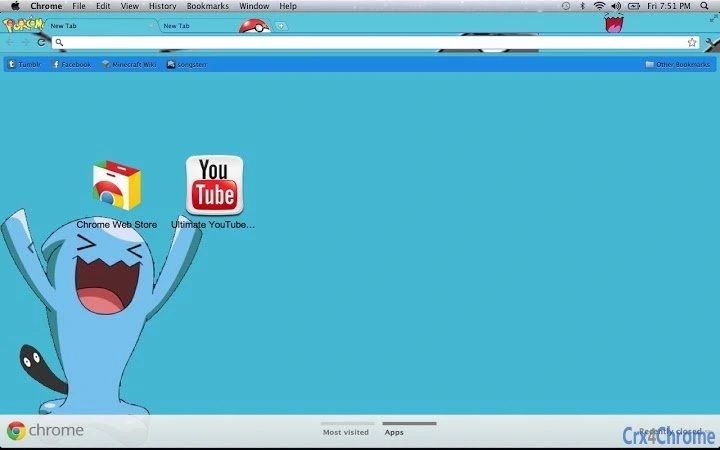
The Wobbuffet Chrome Theme is a specialized browser extension designed to transform the appearance of Google Chrome with a dedicated focus on the iconic Pokémon, Wobbuffet. Tailored for fans of the franchise, this theme offers a visually distinct and immersive experience, emphasizing the character’s unique aesthetic. It serves as a digital expression of fandom, allowing users to personalize their browsing environment with a theme that stands out from generic Pokémon-themed extensions.
Target users include casual internet users, Pokémon enthusiasts, and individuals who value visual customization in their digital tools. The theme is ideal for those seeking a fun, lightweight way to reflect their interests without altering browser functionality. Real-world usage scenarios include personal browsing, social media engagement, and online gaming sessions where a playful, character-driven interface enhances user satisfaction.
The developer did not provide additional background information. No specific system requirements or technical details were disclosed beyond the operating systems supported. Platform compatibility is confirmed for both Windows and Mac, ensuring broad accessibility across major desktop environments.
Key Features & Capabilities
- Wobbuffet-Centric Design – The theme features a full visual overhaul centered on Wobbuffet, incorporating its signature colors, patterns, and playful style to create a cohesive and immersive look.
- Browser Interface Customization – Users can modify the appearance of Chrome’s toolbar, tabs, and new tab page to align with the Wobbuffet aesthetic.
- Lightweight Implementation – At just 1.2 MB, the theme is designed for minimal impact on system resources, ensuring fast loading and smooth operation.
- Easy Installation & Activation – The theme can be applied directly through the Chrome Web Store with a single click, requiring no technical expertise.
- Regular Updates – The theme is maintained under version 1.0, with updates planned to ensure compatibility with future Chrome releases.
Each feature enhances the user’s browsing experience by providing a consistent, fun, and personalized interface. For example, the new tab page may display a stylized Wobbuffet image, while the toolbar reflects the character’s color palette. This level of detail appeals to fans who appreciate attention to detail in digital customization tools.
User Interface, Workflow & Performance
The user interface of the Wobbuffet Chrome Theme is entirely visual, focusing on aesthetic transformation rather than functional interaction. Navigation remains unchanged from standard Chrome behavior, with no additional menus or controls introduced. Users interact with the browser as usual, while the theme alters only the visual presentation.
Workflow efficiency is preserved, as the theme does not interfere with page loading, tab management, or browsing speed. The developer did not specify resource usage details, but based on its 1.2 MB size and lightweight nature, it is expected to have minimal impact on CPU or RAM usage.
Stability is likely consistent with standard Chrome themes, which are sandboxed and isolated from core browser operations. No reports of crashes or conflicts were provided. Performance observations are based on general software behavior patterns, as exact benchmarks were not shared.
Compatibility & System Requirements
The Wobbuffet Chrome Theme is compatible with both Windows and Mac operating systems, supporting the latest versions of Google Chrome on these platforms. The installation size is 1.2 MB, which is typical for browser themes and ensures quick download and minimal disk space usage.
Exact system requirements were not listed. The developer did not specify minimum CPU, RAM, or storage thresholds. Compatibility information is limited to the operating systems confirmed in the product details. Users should ensure their system runs a current version of Chrome to use the theme effectively.
Pros and Cons
Pros
- Unique focus on Wobbuffet, setting it apart from generic Pokémon themes
- Lightweight at just 1.2 MB, minimizing system impact
- Simple one-click installation via Chrome Web Store
- Visually polished design with consistent character representation
- Free to download and use, with no hidden costs
Cons
- No advanced customization options beyond visual appearance
- Functionality limited to aesthetic changes only
- Developer details not publicly available
- Updates are not publicly tracked or announced
- Support for other browsers not confirmed
FAQ Section
Is the Wobbuffet Chrome Theme compatible with Windows and Mac?
Yes, the theme is confirmed to work on both Windows and Mac operating systems, as long as they are running a supported version of Google Chrome.
Is the theme safe to install?
Yes, the theme is distributed through the Chrome Web Store, which applies security checks to all extensions. It is designed to modify only the browser’s appearance and does not collect user data.
Can I use this theme offline?
Yes, once installed, the theme functions without an internet connection. It does not require online access to display its visual elements.
Does the theme require a license or subscription?
No, the theme is completely free to use. There are no licensing fees, subscriptions, or premium tiers.
How do I update the theme?
Updates are automatically managed by the Chrome Web Store. When a new version is available, the browser will prompt the user to update, or the update will occur silently in the background.
Final Thoughts + CTA
The Wobbuffet Chrome Theme delivers a focused, fun, and visually engaging experience for Pokémon fans who want to personalize their browsing environment. Its lightweight design, clean interface, and unique character focus make it a standout option among browser themes. While it lacks advanced functionality, its purpose is clear: to provide a polished, thematic upgrade to Chrome’s appearance.
It is ideal for casual users and dedicated Wobbuffet enthusiasts seeking a simple yet satisfying way to express their fandom. With no cost, easy installation, and broad compatibility, it offers excellent value for its intended audience.
Download Wobbuffet Chrome Theme now







